
Accessibility is a critical dimension of diversity and inclusivity. For neuroimagers, radiographers, radiologists and neurologists, hearing accessibility is of particular importance, whether we are scanning people in the magnetic resonance imaging (MRI) scanner or presenting our results at a conference. In this commentary, we outline the importance of hearing accessibility for the clinical and research neuroimaging communities, describe recent developments in improving hearing accessibility in the MRI environment and at conferences, and share the “results” of the accessibility “experiment” presented at the Organisation for Human Brain Mapping (OHBM) Diversity and Inclusivity Committee (DIC) Roundtable in 2025. While this content was initially developed for use by the OHBM community, the goal is to share general information that improves hearing accessibility for the general clinical and research neuroimaging community.
Hearing accessibility in the MRI scanner
In Australia alone,[1] around 30 million MRI scans are performed each year.1,2 While safe, the magnetic resonance (MR) environment can be challenging for the scanned person for a number of reasons, including claustrophobia, the requirement to stay still, and the safety precautions necessary when working in strong magnetic fields. In both the clinic and research settings, communication with the person in the scanner is imperative to ensure compliance with imaging requirements, ensure patient comfort, and improve image quality. Despite its importance, communication between radiographer (or technician) and patient is challenging, due to poor audio equipment in many scanners, and the requirement for patients to wear earplugs during the scan. This problem is exacerbated for people who cannot use their hearing devices in the scanner. In particular, people with cochlear implants must not enter the MRI scanner room unless MRI safety has been confirmed for their specific device. Another barrier is encountered when working with culturally and linguistically diverse (CALD) people. Communication with people who either do not fluently speak or understand the dominant language of the country where they are being scanned, can present similar barriers to scan compliance.
Automated captioning offers a potential solution. In recent years, advances in speech recognition have made captioning more accurate, flexible, and accessible. Transcription apps require little technical setup, and work well with different voices, accents, and languages. One example is NALscribe, a captioning app available for free from the Apple App Store, which was developed by Australia’s National Acoustic Laboratories initially for use in hearing clinics in the global pandemic.3 Since then, it has been adopted more widely in everyday contexts, such as family gatherings, classrooms, and workplaces. Feedback from users highlights its impact in confirming what was heard, reducing misunderstandings, supporting inclusion, and enabling fuller participation.
These advantages take on particular importance in the MRI setting. While most efforts currently focus on spoken communication, captioning provides an alternative that enables radiographers to give instructions clearly and, at the same time, engage in casual conversation to help patients feel at ease. The result is a more natural and reassuring interaction that supports patient comfort, improves compliance, and ultimately enhances the quality of the scan.
Demonstration
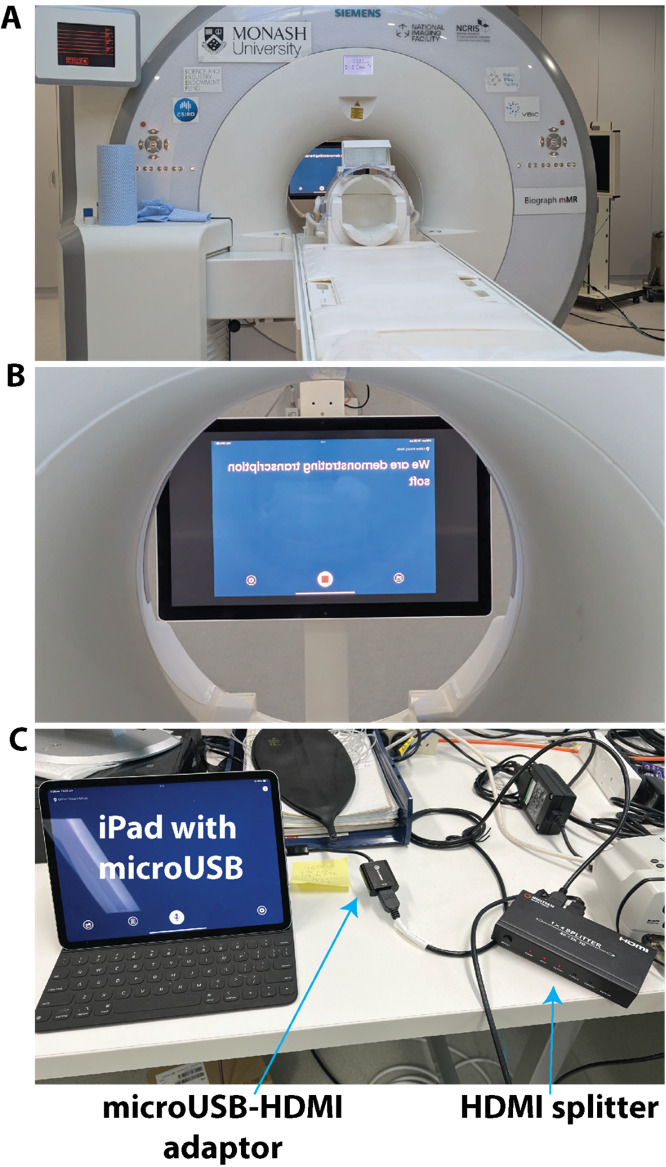
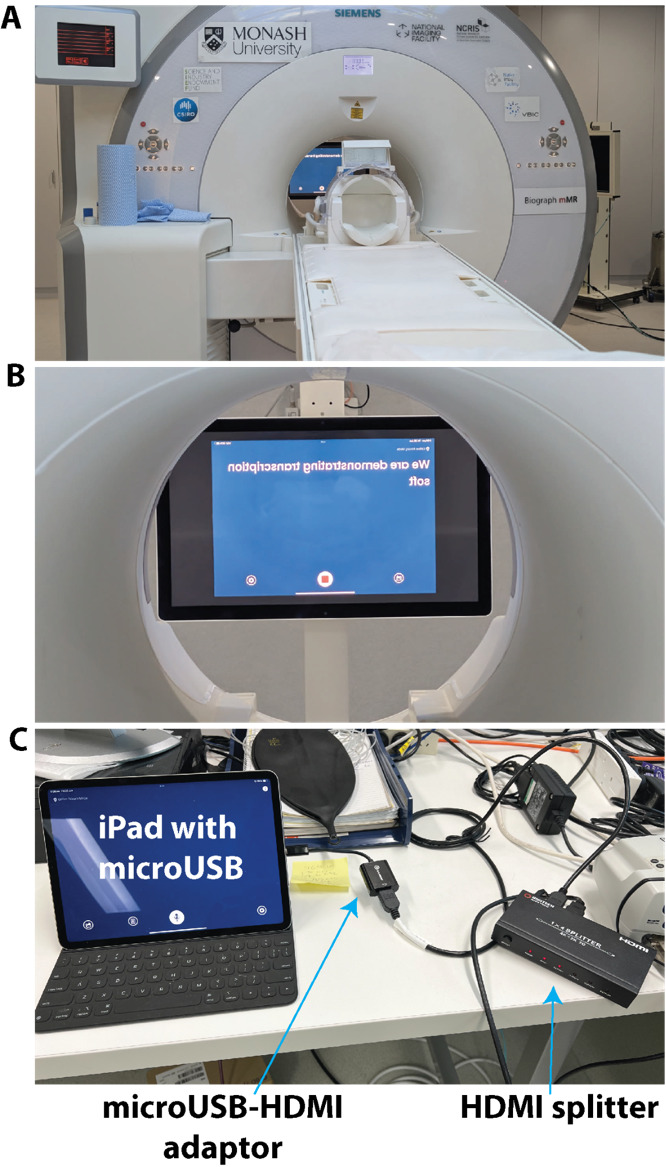
We demonstrated the feasibility of using NALscribe for a child with hearing loss in a 3T MRI scanner. The set up of the transcription equipment was very simple, relying on a standard iPad and standard in-scanner stimulus presentation equipment (Figure 1). The simplicity of the set up means that it can be installed easily at any MRI facility at low cost. Video 1 (https://doi.org/10.5281/zenodo.17128149) shows the outcome of the demonstration. Without transcription, the patient reported being able to hear some aspects of the radiographer’s instructions (i.e., knew there was someone talking) but was unclear what the instructions were. With the transcription, the patient reported fully understanding the spoken instructions. The video finishes by showing a humorous interaction between the radiographer and patient, which demonstrates that natural language is possible with the transcription software. This is important as the need to adapt language to interact with a device can present an obstacle to effective transcription.4 The radiographer reported that transcription may be improved with the use of an additional microphone connected to the iPad.
In a second demonstration, we tested the utility of an off-the-shelf translation app, GoogleTranslate, to improve accessibility for CALD people. The equipment used was identical to that shown in Figure 1. Video 2 (https://doi.org/10.5281/zenodo.17128149) shows the outcome of this demonstration. The radiographer reported more transcription errors with GoogleTranslate than with NALscribe, which he felt would likely be improved with the addition of an external microphone. For the Portuguese-English translation, the patient and radiographer reported that natural language was possible, as demonstrated in the video. For the Portuguese-Vietnamese translation, both radiographer and patient reported that the translation was unusable. This was despite both patient and radiographer attempting to speak in a slow, stereotyped, unnatural manner. We are unaware of previous studies examining Portuguese-Vietnamese translation, although our experience with Portuguese-English translation is consistent with previous reports of good accuracy with recent versions of GoogleTranslate.5,6
Finally, people with certain types of hearing disorders such as hyperacusis can experience great discomfort with loud or noisy sounds, which can be exacerbated by some pulse sequences in the scanner.7 In this case, captioning apps could be complemented by optimizing hearing protection devices,8 pulse sequences9 and noise cancellation.10
Hearing accessibility at conferences
Organising accessible conferences starts with the organisers and ends with the participants. Here, we focus on how the individual can ensure their presentation is accessible, however the interested reader can refer to several excellent comprehensive guides on accessible conference organisation, including the Zero Project11 and the one developed by the Queensland government.12
While hearing accessibility initiatives at conferences are often offered to enable people with sensory impairments to participate fully in the meeting, hearing accessibility principles actually improve the comprehension of spoken language for the vast majority of people. CALD people and people with sensory processing difficulties (common in older age, neurodegenerative illness, and in conditions like ADHD, autism and learning disorder) benefit from these principles. It is simply good communication practice to ensure that your message is heard and understood by as many people as possible.
Microphones
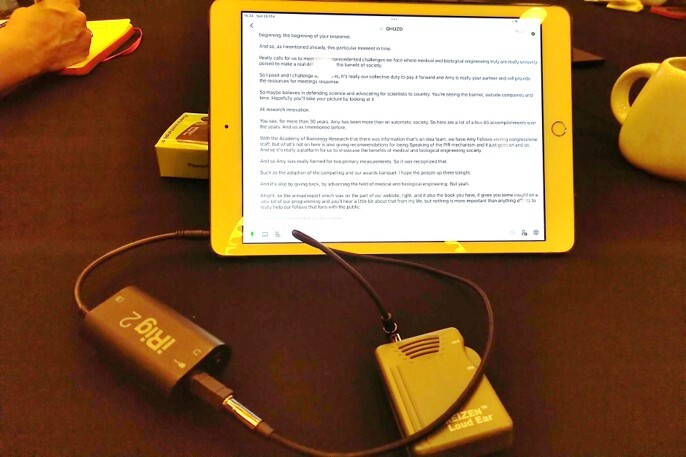
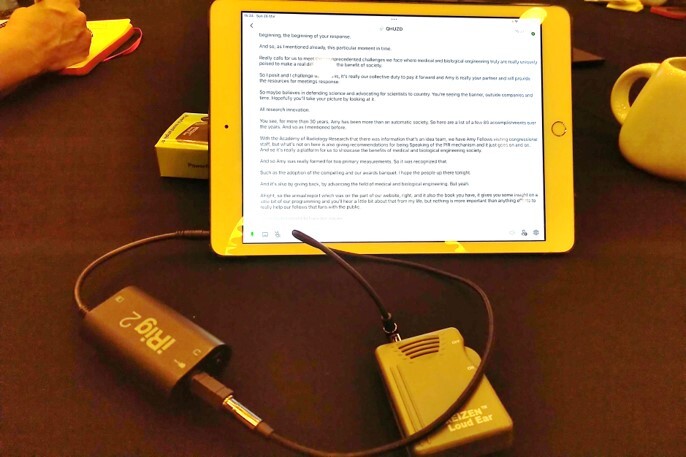
The simplest, and by far most effective, approach to ensuring the presentation is heard by everyone is consistent and proper use of the microphone. It is not acceptable to decline to use the microphone; speaking loudly or ‘projecting the voice’ (which can only really be performed by trained speakers) are not acceptable replacements for using the microphone. It is also not acceptable to ask if anyone in the audience needs the microphone to be used as it shifts the responsibility from the speaker to the audience to ensure the communication is clear. There are at least five reasons why speakers should use the microphone. Firstly, in most venues, hearing accessibility technology (e.g., induction loops) are linked to the microphone (Figure 2). Speakers are not aware of how many people in their audience may be linked to the hearing technology. For this reason, it is good practice to repeat any audience questions delivered without a microphone so everyone can hear. Secondly, it is simply the case that people who consider themselves ‘loud speakers’ or ‘voice projectors’ are not actually as loud as they think they are (they often begin a sentence loud then quickly revert to a less audible level) or have not trained in voice projection. Thirdly, signal amplification and noise reduction improves comprehension by CALD people whose primary language is different to the presentation.13 Fourthly, cognitive and processing load increases with increasing difficulty of perceiving speech sounds.14,15 Not amplifying the voice fatigues the audience. Finally, the entire point of a presentation is communicating your science to the audience: if everyone cannot easily hear and understand your message, you have not achieved your goal.
To understand the microphone system as well as room acoustics at a conference, it is best practice to check with the audio/visual (A/V) support at the venue. For example, large auditoriums have integrated sound mixers and speakers as well as panels that mitigate reverberation,16 while smaller rooms need portable sound mixers.17 However, as not all venues have dedicated A/V support, a few rules of thumb can help to ensure optimal use of the microphone. Many venues use fixed ‘gooseneck’ microphones mounted to a lectern. The speaker should ensure that the microphone is aimed at the head; if the previous speaker was significantly shorter or taller than the current speaker, the microphone should be adjusted to the correct position. Position yourself 10-15cm from the microphone; moving away from the microphone or turning the head away (e.g., to the slides) reduces the quality of the amplification and should be avoided. For venues with wireless microphones, the microphone should be clipped around the top of breast pocket level, just below the collarbone, to ensure optimal amplification. For handheld microphones, position the microphone about 3-5cm from the mouth, with the microphone consistently held at that position. For all microphone types, avoid positioning the microphone directly below the mouth or nose where it may pick up breathing noises.
As mentioned above, transcription of speech in MRI clinics can be improved with additional microphones. For the radiographer, a one-time purchase of either lapel or bluetooth or podcast microphone could substantially enhance the quality of the interaction. For the patient, current scanners are equipped with background noise cancellation microphones.
Captioning: Technology readily available now
People with hearing loss, older people, CALD people and people with neurodivergence and sensory processing disorders benefit from captioning. The addition of captions means that the communication is received in two sensory inputs. It is known from bilingual and educational psychology that comprehension and retention is improved when content is delivered both orally and with captions, even for native speakers.18–20 Live transcription in English is readily available in Google Slides and Microsoft Powerpoint 365, simply by enabling the feature in the slideshow settings. Similarly, Zoom, Google Meet and Microsoft Teams offer a caption box for virtual or hybrid talks with microphones (see above). When presenting subtitles, the caption box is preferably positioned above the slides, as captions presented at the bottom of the slides may not be visible to everyone in the audience. Although this technology is readily available, it is not currently widely used at the OHBM conference. In the spirit of “Tous pour un, un pour tous” (All for one, one for all), it would be immensely helpful in the future if all presentations were set by default to provide captions.
Regarding the costs of these potential solutions, external monitors, a sound mixer, microphones and speakers are typically provided at both small and large meetings. In the former case, a one-time purchase of a laptop may be necessary while in the latter case, a speaker ready room with computers available for presenters to upload their slides. Thus, there should be negligible cost to the attendees to implement captioning, which stands in contrast with the substantial cost for human captioning at large meetings running into thousands of dollars.
Some facilities offer the capability for integrating audio with hearing aids or cochlear implants via assistive listening devices and/or bluetooth (e.g., Auracast). In the same way, it should be possible to integrate the audio signal with captioning apps on smartphones or tablets which allow for tracking back and saving transcripts (Figure 2). This was not necessary at a recent scientific trade conference which provided captioning for all podium and keynote talks at no cost to attendees who scanned QR codes posted outside meeting rooms to access the captions on their smartphones or tablets.
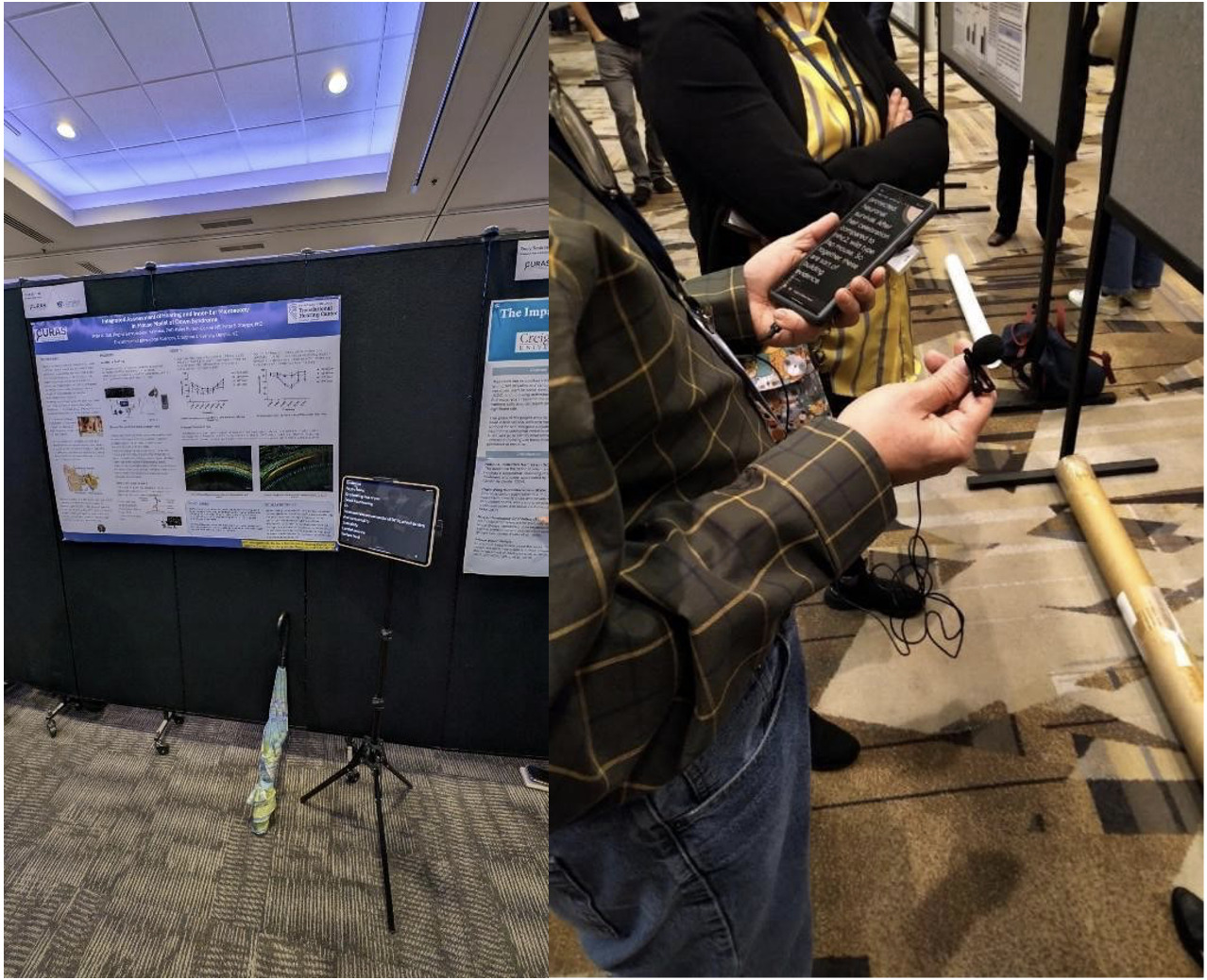
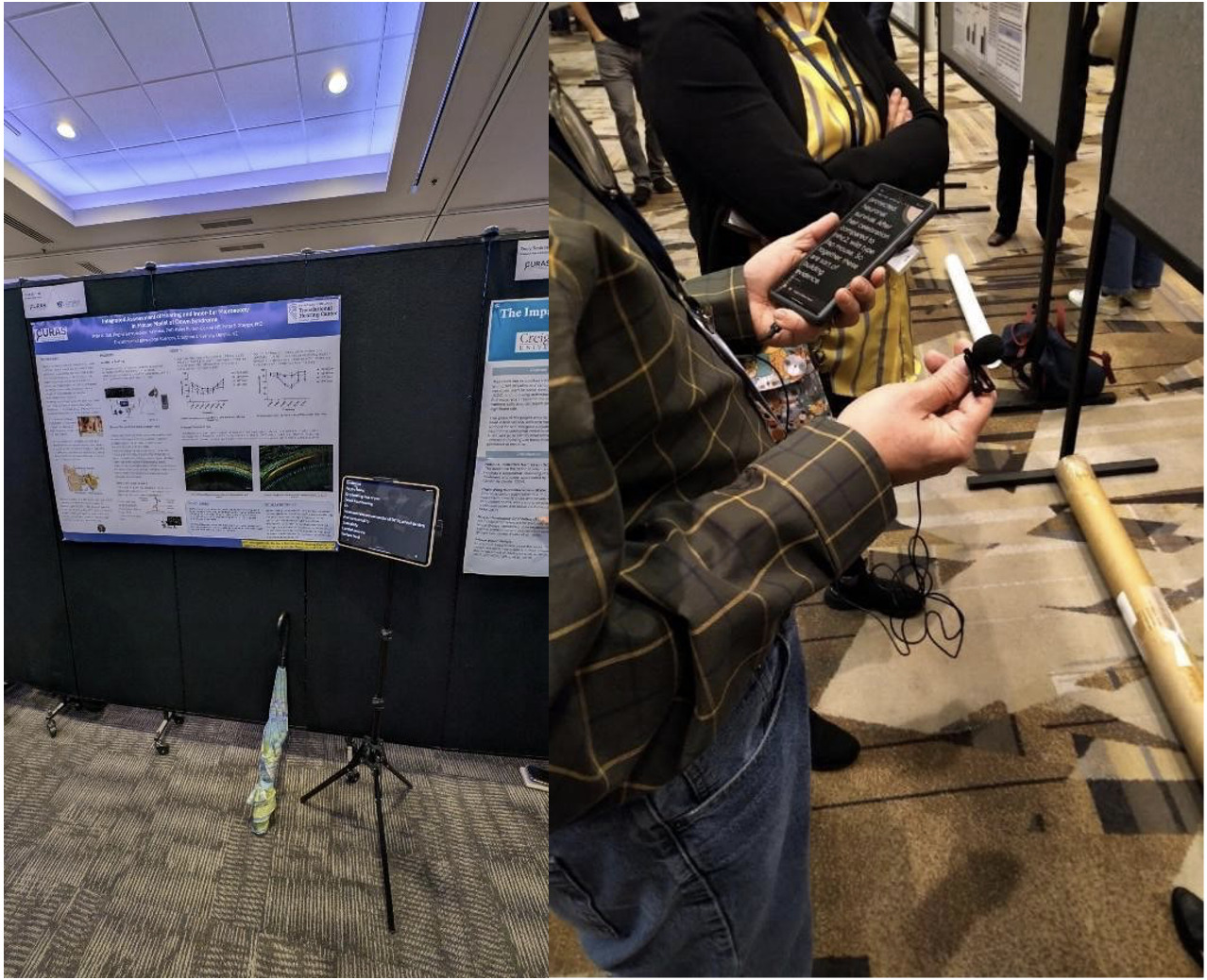
In addition, viewing posters can be challenging even for those with typical hearing due to the extensive ambient noise in poster halls. Figure 3 demonstrates recent solutions to address this problem. Specifically, a bluetooth or lapel microphone (with noise cancellation features) connected to a tablet or smartphone enabled the attendee or presenter to interact with each other. In a similar manner, incidental listening can be picked up in public areas.
A more ambitious goal is to enable presenters to deliver their presentation in their native language, with real-time translation to English. This, as we demonstrated at the OHBM 2025 meeting, is actually possible now (see below). Both Google Slides and Microsoft Powerpoint 365 provide subtitles in several languages; the caption box can be customized for automated translation from the speaker’s native language to English. This technology can provide important benefits for CALD people presenting at and attending conferences. As English continues to be the primary language at most international conferences, including OHBM, presenting in English may present a challenge or hurdle for CALD people and may thus prevent them from seeking to present at these conferences out of concern that they may not express their ideas as effectively as they can in their native language despite being able to generally communicate in English. In addition, the technology will also mitigate the issue of varied accents or pronunciation if CALD people choose to present in English. With current technology, such as Microsoft Powerpoint 365 offering the real-time translation, this makes it possible for presenters to present in their native language (for languages that are available in such software), which then gets translated in real-time into English for the subtitles. We describe our use of this technology in detail below.
Demonstration
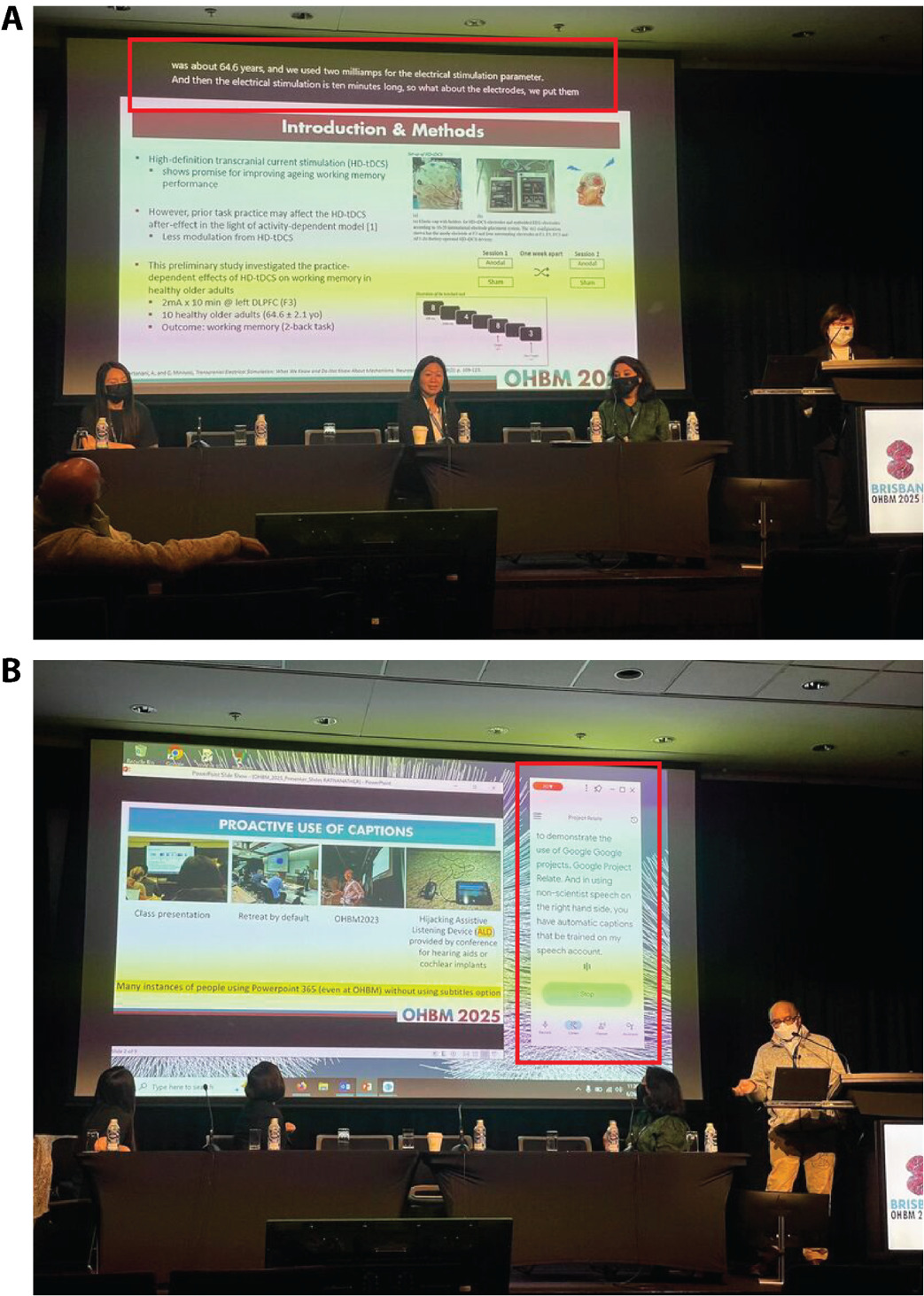
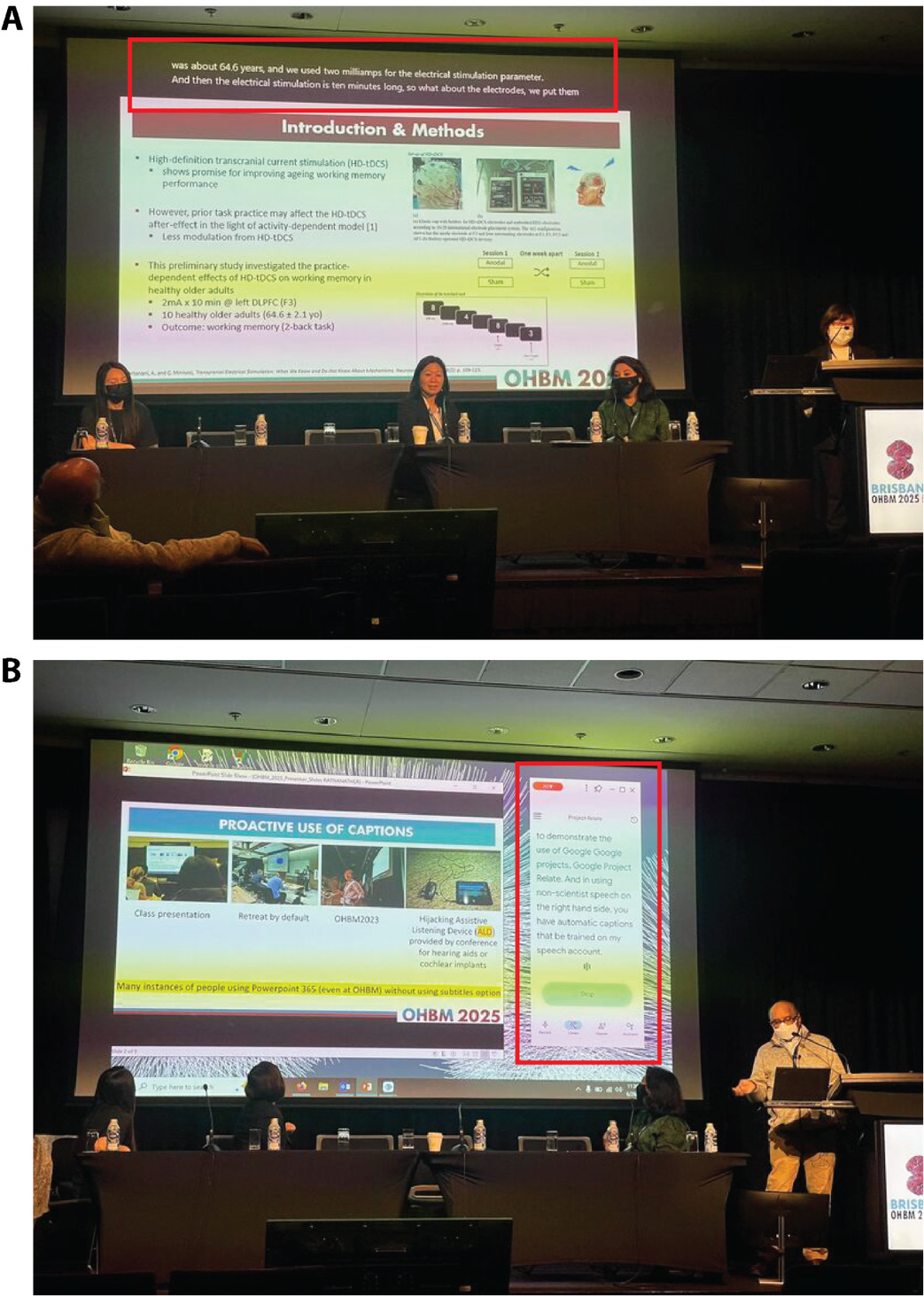
We demonstrated the feasibility of real-time translation at the OHBM 2025 DIC roundtable in two brief presentations. Figure 4A shows how the translation feature in Microsoft Powerpoint 365 was used to present neuroscience research in two Chinese languages. Our initial goal was for one presentation in Mandarin, and another in Cantonese, however the Powerpoint 365 version at the conference venue did not have a Cantonese translation package. Broadening the number of languages available in these translation packages is an issue that we hope could be addressed with more proactive engagement with the A/V support in the future. As such the Cantonese speaker translated her own presentation into Mandarin, which was then translated into English. The other presentation in Mandarin ran smoothly. Both speakers presented in their natural style and pace. The speakers reported that the opportunity to present in their native language allowed them to convey their research in a more nuanced and naturalistic manner, which resembles a more authentic way of expression. They also reported that use of native language also allowed the speakers to use the right choice of words to convey the meaning more precisely. From the perspective of an audience member, the translation appeared accurate (i.e., appeared to reflect correct scientific content and jargon), however the speed of the subtitles hindered full comprehension. This may be due to grammatical differences between Mandarin and English - the English grammar was still being corrected as the captions moved off screen. This could be improved by having captions that remain on the screen for longer, or by the speaker slowing down (albeit disrupting their natural prosody). Another audience member suggested that if live translation is used more widely in the future, then non-English speakers could be allocated a slightly longer presentation length to allow for slower translation.
Captioning for special cases (non-standard speech): Technology available now
Unfortunately, transcription accuracy is degraded with non-standard speech such as accents due to hearing loss or speech impediments associated with Parkinson’s disease, Amyotrophic Lateral Sclerosis and palsy, to name but a few. Project Relate21 is an Android beta app from Google that enables transcription of non-standard speech. In parallel, Project Euphonia22 is an on-going Google Research project to facilitate communication for people with atypical speech. Specifically, Relate requires training on a preset vocabulary of 500 phrases as well as additional ones provided by the speaker. The transcription is then “mirrored” alongside the Powerpoint slides in “reader mode” as shown in Figure 4B. Relate was used by its own developer who presented without problems at a keynote talk (using a LaTeX Beamer generated PDF) at a mathematics conference. Thus, one can imagine a scenario when Relate or Euphonia could be used by a patient with speech impediment undergoing a scan.
Future directions
It is an exciting time in the field of hearing accessibility. Looking ahead, there is great potential for AI-driven tools to reshape communication in healthcare. Captioning is moving beyond simple transcription toward approaches that capture tone, emphasis, and emotional nuance. This could help patients understand not only the words spoken but also the intent and reassurance behind them - especially valuable when people are anxious or in unfamiliar situations such as the MRI environment. Speech recognition systems can also be trained on dictionaries tailored to specific contexts, such as medical vocabulary or radiology terminology, further improving accuracy and making captions more relevant in clinical environments. In fact, Jackson et al.23 showed that adding a dictionary of words taken from abstracts of talks presented at a scientific conference improves the accuracy of transcription, particularly for those with accents or unclear speech. This could be a minimum requirement for hearing accessibility at future conferences. Training for radiographers and MRI technicians could also benefit from AI simulation platforms. For example, tools like NAL Virtual Personas allow natural conversation with a simulated client, using live transcription and multilingual support.24 This makes it possible to practise communication skills in different languages and contexts, preparing clinicians to interact more effectively with diverse patients. In combination with advances in captioning and translation, such tools could help healthcare professionals build both technical and interpersonal confidence.
Finally, emerging technologies such as Auracast,25 including background noise suppression, speaker identification with directional microphones and smart glasses with captions should facilitate a seamless personalised experience both for the conference attendee and speaker. This could be useful for example at poster sessions at conferences, and for the scan subject communicating with the radiographer while participating in complex functional neuroimaging studies. On the consumer side, products like the Ray-Ban Meta smart glasses and Apple’s AirPods Pro 3 earbuds offer live audio translation. This allows a listener to hear someone speaking in another language while receiving an immediate translated version directly to their ear. At the same time, a text transcript of the conversation appears on the smartphone for later reference. This is a major step beyond today’s translation apps, which typically deliver speech only after the speaker pauses. Instead of waiting for the speaker to finish, current systems stream the translation continuously, allowing a more natural dialogue flow. The translated audio is delivered via directional speakers in the arms of smart glasses, or directly via earbuds, minimising disruption to the speaker’s flow. These advances point toward a future where translation and transcription are integrated, invisible features that help people connect smoothly across languages and contexts.
Conclusion
In this commentary, we have showcased hearing accessibility principles that can improve speech comprehension both in the MRI scanner and at conferences such as OHBM. While we have focused on hearing accessibility in this manuscript, hearing accessibility is but one of many principles of universal design26,27 which focuses on ensuring that the built environment and technologies are usable for the people who wish to use it. More information about universal design as well as the 7 principles of universal design can be found at this website.28 We have focused on low-cost solutions using widely available technologies to demonstrate how hearing accessibility can be improved in the clinic and at conferences. Similar principles are available to improve other aspects of accessibility such as visual accessibility.11,12 We encourage the neuroimaging community to embrace these simple and low-cost solutions to ensure that their communication is optimised for all listeners.
–
Acknowledgements
Jamadar is supported by an Australian Research Council Fellowship FT250100206.
We thank Rufus Dyball, Richard McIntyre, Priscila Levi, Cuong Tran, and Parisa Zakavi at Monash Biomedical Imaging for assistance with in-scanner transcription. Permission for image use has been obtained from all individuals (and guardian of the child) shown in the videos in this manuscript. We also thank the OHBM Diversity & Inclusivity Committee (DIC) and Council for their support of this initiative.
Conflicts of Interest
In this manuscript, we have named several toolboxes and resources. These resources are mentioned as they are widely available and are either free or typically subsidised. We have no prior relationship with the providers of any of these resources, except National Acoustics Laboratories (NAL), which receives funding from the Australian Government Department of Health, Disability and Ageing, which is the employer of author NCW.
Supplementary Information
Videos 1 and 2 are available at https://doi.org/10.5281/zenodo.17128149.
Here, we use Australian statistics as the OHBM 2025 meeting was held in Australia; however most statistical proportions hold across most countries.